Handling movement schedules
There are a lot of scenario's and cases to keep in mind when trying to understand movement schedules. What is the duty of the transporter? Which information does the contractor supply? Does the traveler have to do anything? This tutorial will answer questions like these to give you a better understanding of the movement schedule workflow.
Versioning
The examples use OData version "3.0" and an API version of "25.0", the most current versions at the time of writing.
Tools
The tutorial is platform, language, framework and IDE independent. For testing purposes or to simply follow along the tutorial you can use a HTTP request tools like HttpRequester for Firefox, Postman for Google Chrome, Fiddler or any other REST client.
Authentication
In this example we use Basic Authentication. The username and password should be combined like username:password, for example test@test.com:test123. This string should be converted to bytes (using UTF8-encoding) and converted back to string using Base64, and preceded by the term "Basic ". When applied to the example, it should look like "Basic dGVzdEB0ZXN0LmNvbTp0ZXN0MTIz". In every request to CCP, the header "Authorization" should be present having this value.
What is a movement schedule?
A movement schedule is used to model the entire traveling requirements of a certain traveler (short term and long term). Movement schedules are used in the field where there is an external party (called the Contractor), which maintains a number of Travelers, who need to be transported by one or more Transporters.
The contractor first registers the Travelers at the Transporter, including all kinds of extra information, like Addresses and ContactInformations, using CCP. When the travelers are registered at the Transporter, the contractor then sends the movement schedules of the Travelers to CCP, each consisting of a set of MovementSchedule lines.
All this information should be used by the Transporter as input to the planning process for the Travelers. The result of this planning (which is a complex process, that falls beyond the range of CCP at this moment) is that for every day and for every Traveler, Trips (with underlying Movements per Traveler) are being created, according to the movement schedule, which actually has to be carried out by the Transporter.
It can happen that a Traveler wants to deviate from its movement schedule. We distinguish between the following cases:
- Absences
In case of illness, holidays and such, when the Traveler does not travel at all (using the Transporter), Absence-records are made. These absences override the possible Movements that were made. The Transporter should not pickup the Traveler when there is an absence-record that covers the movement. - Location exceptions
When a Location that is refered to by a Movement (as PickUpLocation or DropOffLocation) is temporarily closed, LocationException-records are made. These location exceptions override the possible Movements that were made. The Transporter should not pickup the Traveler when there is a location exception that covers the movement. - Mutations to the schedule
When the current movement schedule needs to change or needs to stop, new MovementSchedule-records can be made that override the normal movement schedules. These records are called mutations. There are two types of mutations, namely mutations with TimeTypeName Absent, called absent mutations, and 'normal' mutations, where the TimeTypeName is anything else. Absent mutations are used to (temporarily) stop a movement schedule, the range (ValidFrom/ValidUntil) indicates when the movement schedule is stopped and the ParentId indicates which movement schedule is stopped. To actually change a movement schedule, a mutation should be added in addition to the absent mutation. Their ParentId should always point to the root of the movement schedule, in other words the schedule with a ParentId of null. Optionally (but highly advised), one unique GenerationId can be added to all newly created mutations. This can be used later to determine which mutations were added for one edit, for instance to delete/undo an edit.
What does the movement schedule contain?
A basic schedule for a certain Traveler is made up a number of MovementSchedule-records. Each record contains the day of the week, direction, validity, pickup/dropoff information and a lot more. If a traveler should be transported 5 days a week, 2 times a day that's 10 records per traveler.
The following example shows how you can perform an OData-request to obtain all movement schedule records for a certain traveler:
GET /CCPService/DataServiceCCP.svc/MovementSchedules?$filter=TravelerId eq 3320 HTTP/1.1
Authorization: Basic dGVzdEB0ZXN0LmNvbTp0ZXN0MTIz
Accept: application/json
Content-Type: application/json
DataServiceVersion: 3.0
MaxDataServiceVersion: 3.0
CabmanCloudPlatformVersion: 18.0
MaxCabmanCloudPlatformVersion: 18.0
With the following result:
{
  "odata.metadata": "http://localhost/CCPService/DataServiceCCP.svc/$metadata#MovementSchedules",
  "value": [
    {
      "MovementScheduleId": 6489,
      "Remark": null,
      "DayOfWeekName": "Monday",
      "MovementScopeName": "To",
      "Time": "2016-07-18T00:00:00",
      "TimeTypeName": "PickUp",
      "RecurrenceTypeName": "All",
      "RecurrenceWeekName": null,
      "RecurrenceInterval": null,
      "RecurrenceMonth": null,
      "RecurrenceDay": null,
      "CreationDateTime": "1980-01-01T00:00:00",
      "RegistrationDateTime": "1980-01-01T00:00:00",
      "LastUpdatedUsername": "Vervoerder1",
      "CreatorUsername": "Vervoerder1",
      "LastUpdated": "2016-02-02T12:09:01.477",
      "Deleted": false,
      "ValidFrom": "2014-01-30T00:00:00",
      "ValidUntil": "2015-01-30T00:00:00",
      "Approved": false,
      "OwnerContractorId": null,
      "OwnerTransporterId": 1,
      "TravelerId": 652,
      "TransporterId": 1,
      "ContractorId": 4,
      "CostCenterId": null,
      "PickUpLocationId": null,
      "DropOffLocationId": null,
      "ParentId": null,
      "StatusName": null,
      "StatusDescription": "Pietje",
      "PickUp": {
        "BusStopNumber": null,
        "Description": null,
        "PhoneNumber": null,
        "AirportCode": null,
        "FlightNumber": null,
        "Address": {
          "Street": "Dokter A.F. Philipsweg",
          "Number": 53,
          "Addition": null,
          "PostalCode": "9403AD",
          "State": null,
          "Town": "Assen",
          "CountryId": 528,
          "Coordinates": {
            "Latitude": null,
            "Longitude": null,
            "FormatName": null
          }
        }
      },
      "DropOff": {
        "BusStopNumber": null,
        "Description": null,
        "PhoneNumber": null,
        "AirportCode": null,
        "FlightNumber": null,
        "Address": {
          "Street": "Lieve-Vrouweplein",
          "Number": 9,
          "Addition": "10",
          "PostalCode": "5038TS",
          "State": null,
          "Town": "TILBURG",
          "CountryId": 528,
          "Coordinates": {
            "Latitude": null,
            "Longitude": null,
            "FormatName": null
          }
        }
      }
    },
    ::
    {the rest of the array}
    ::
    ]
}
Here we see a JSON-array containing one or more MovementSchedules records. Only the first record is shown in this example. The most important properties are detailed below:
- The validity of the record.
The record is valid between ValidFrom and ValidUntil (including), and only on the days that comply to the recurrence pattern, which will be detailed later. - The traveling time-of-day.
The requested traveling time-of-day can be specified using property Time, in combination with TimeTypeName, which can have the values "Pickup" (traveler should be picked up at the given Time) or "Arrival" (traveler should arrive at the given DropOff-position at the given Time). TimeTypeName can also have the value "Absent" which should only be used for mutations, which will be detailed later. - The pickup and dropoff location.
The complex (MovementScheduleFragment) properties PickUp and DropOff contain the pickup and dropoff address respectively. It it is also possible to specify a Location by filling PickUpLocationId and/or DropOffLocationId, whereby the respective Address-fragment should be ignored and the address should be obtained from the Location-record. - The ownership of the record.Both Transporters and Contractors can create MovementSchedule-records. The party that creates the record becomes the owner of the record (specified in OwnerContractorId and OwnerTransporterId) and it cannot be changed afterwards. Only the owner of the record has the right to modify or to delete the record.
Recurrence pattern
The following properties are used to specify the recurrence pattern:- DayOfWeekName: The day-of-week: "Monday", "Tuesday", "Wednesday", "Thursday", "Friday", "Saturday", "Sunday". When RecurrenceType = "Weekly", multiple days are possible (comma-separated) and combinations "WorkingDays" (= "Monday, ... Friday"), "Weekend" (= "Saturday,Sunday") and "EveryDay" (= "Monday, ... Sunday") as well.
- RecurrenceTypeName: Can have the values "All", "Even", "Odd", "Daily", "Weekly", "Monthly" and "Yearly". This property replaces the property WeekTypeName in lower versions of the CCP-interface (<18), which could only have the values "All", "Even", "Odd".
- RecurrenceWeekName: Can have the values "First", "Second", "Third", "Fourth" and "Last"
- RecurrenceInterval: Specifies the interval (every n days/weeks/months, etc.)
- RecurrenceMonth: The month number (1..12)
- RecurrenceDay: The day number (1..31)
| Scenario: | RecurrenceTypeName | DayOfWeekName | RecurrenceWeek… | RecurrenceInterval | RecurrenceMonth | RecurrenceDay |
|---|---|---|---|---|---|---|
| a | b | c | d | e | ||
| Every [day a] | "All" | ● | - | - | - | - |
| Every [day a] on even weeks 1) | "Even" | ● | - | - | - | - |
| Every [day a] on odd weeks 1) | "Odd" | ● | - | - | - | - |
| Daily - Every c day(s) | "Daily" | - | - | ● | - | - |
| Daily - Every working day | "Weekly"(!) | "WorkingDays" | - | 1 | - | - |
| Weekly - Returns every c week(s) on [day a] | "Weekly" | ●● 2) | - | ● | - | - |
| Monthly - Day e of every c month | "Monthly" | - | null | ● | - | ● |
| Monthly - The b'th [day a] of every c month(s). | "Monthly" | ● | ● | ● | - | - |
| Yearly - Returns every c year on [month d], [day e] | "Yearly" | - | null | ● | ● | ● |
| Yearly - Returns every c year on the b'th [day a] of [month d] | "Yearly" | ● | ● | ● | ● | - |
1) When RecurrenceTypeName is "Even" or "Odd", the pattern applies to absolute weeknumbers, based on ISO 8601.
2) Multiple values are possible (comma separated).
Restrictions regarding movement schedules
Movement schedules are mostly immutable. After creation they cannot be deleted nor edited, except for the range (ValidFrom and ValidUntil) and status (StatusName and StatusDescription). To end a movement-schedule permanently, the Deleted property can be set, as long as the movement schedule record starts in the future. When the schedule is already active the owner should change the ValidUntil property to the last valid date. To disable a movement-schedule temporarily, the owner should create a new MovementSchedule-record that overrides the said record. This is called a mutation, which is detailed below. Of the properties ValidFrom and ValidUntil, only the date-part (not the time-part) should be used. Both ValidFrom and ValidUntil are inclusive, meaning that they include the first and last day of the validity period.
Mutations
Mutations are MovementSchedule-records itself, which are layered on top an existing MovementSchedule-record (which can be a mutation as well!). During the ValidFrom/ValidUntil period of the mutation it overrides the underlying MovementSchedule. The following rules apply to absent mutations:
- The TimeTypeName should have the value "Absent".
- The following properties should be ignored: Time, PickUpLocationId, DropOffLocationId, PickUp and DropOff.
- The ParentId of the absent mutation has to contain the MovementScheduleId of the overriden record.
The following rules apply to non-absent mutations:
- The TimeTypeName should not have the value "Absent".
- The ParentId of the mutation has to contain the MovementScheduleId of the root, or base record.
The following rules apply both:
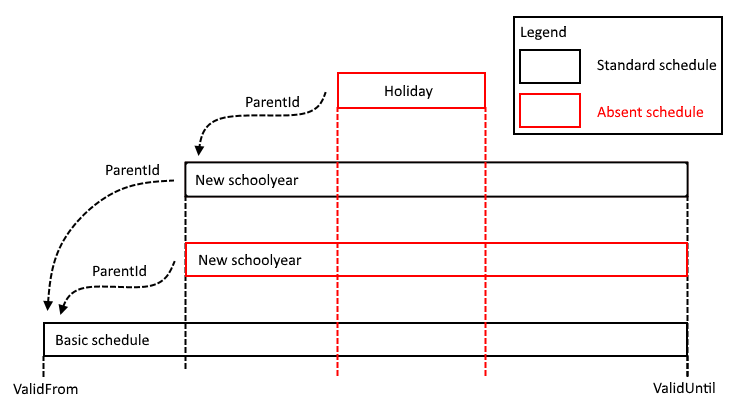
This example shows a basic movement schedule that is overridden for a new schoolyear, for instance because the times have changed. During this schoolyear, the traveler has one holiday. For the new schoolyear, two mutations are added. One to 'absentize' the original and one that represents the new schoolyear. During the holiday, the traveler is not transported at all, so we create only an absent mutation.
Finding out which movement schedule records are valid for today
A common problem is to find out which movement schedule records are valid for a certain date. This can be a complex process, not only because of mutations that override other movement schedule records, but also because of the (complex) recurrence pattern the schedule can have. To make things easier, a function import GetValidMovementSchedules is available, where you can query for all movement schedule records that are valid for a given Traveler, during a certain date-range (from/until). The query can be further narrowed down by filtering on transporterId, contractorId and movementScopeName.
NOTE: It is advised to have from equal to until, so that the function covers just a single day. In that case it can be guaranteed that the resulting movement schedule records are valid throughout the requested range. When from/until covers a longer period, you need to use additional filtering for each day in the given range, because there could be records that are only valid on a certain day in the given range.
Synchronization
To keep the movements schedules and the other data bidirectionaly synchronized with an external planning system, the synchronization mechanism should be used, which is described in the guide Synchronization
Feedback about processing the movement schedule
To notify the owner of the MovementSchedule about the planning status of the movement schedule, the transporter can fill in the StatusName field during the process. The default value is null ('unknown'). The transporter can set the StatusName to the following values:
- Received
MovementSchedule received but not processed yet - Rejected
MovementSchedule rejected by planner - Processed
MovementSchedule processed by planner - Error
There was a problem assigning the MovementSchedule (see StatusDescription for the reason)
There is also a string-property StatusDescription, in which the Transporter can explain the feedback in his own words. This is especially important when StatusName is set to "Error", so the Transporter can explain what is going wrong.
Most of the time the transporter will not be the owner of the MovementSchedule and has no writing rights on that entry. To still be able to set the MovementSchedule's StatusName and StatusDescription, a function import MovementSchedule.UpdateState is available, which should be called instead, like follows:
POST /CCPService/DataServiceCCP.svc/MovementSchedules(6489)/UpdateState
Authorization: Basic dGVzdEB0ZXN0LmNvbTp0ZXN0MTIz
Accept: application/json
Content-Type: application/json
DataServiceVersion: 3.0
MaxDataServiceVersion: 3.0
CabmanCloudPlatformVersion: 18.0
MaxCabmanCloudPlatformVersion: 18.0
Having the following body:
{
    "StatusName": "Error",
    "StatusDescription": "Is overlapping another movement schedule!"
}